
Introduction
Here’s something nobody warns you about when you start doing research: your final paper is only as good as the sources you dig up. Thesis, literature review, a quick clinical question at 11 p.m, it all comes back to how well you can search.
And PubMed can be maddening. You type in a topic and get 8,000 search results, most of which won’t be the ones you were looking for. Or worse, you wrap up a search feeling pretty good about it, then trip over a paper everyone in your field cites and wonder how on earth you missed it. Some people burn a whole afternoon and still walk away empty-handed.
The good news? PubMed is free. The catch? It only pays off if you know how to use it.
This guide takes you through the whole thing, your first keyword, then the tricks that actually save time. Stick with it, and you’ll search faster and pull better papers.
What is PubMed and Why Do Researchers Use It?
PubMed is a free search engine built for medical and life sciences research. The U.S. National Library of Medicine runs it, and that sits under the National Institutes of Health. Inside, you’ll find well over 36 million citations pulled from medical journals going back decades.
Plenty of beginners mix it up with Google Scholar. Understandable, but they’re not the same animal. Scholars cast a wide net across every academic field and scrape the open web. PubMed sticks to health and medicine, and it’s carefully curated. That’s exactly why its results feel cleaner and more dependable for clinical work.
There’s also a quality filter baked in. Journals have to clear a review process before PubMed indexes them, so what you find tends to hold up. It’s the reason most health research starts here. Need peer-reviewed evidence you can actually cite? This is your first stop.
Before You Search, Define Your Research Question
A fuzzy question gets you a fuzzy search. Simple as that. If you can’t say exactly what you’re after, PubMed doesn’t stand a chance of finding it for you.
So break the question into pieces first. Lots of researchers lean on the PICO framework, Patient, Intervention, Comparison, Outcome. You won’t always need all four, but it’s a handy way to pin down the main ideas.
Say your question is: “Does vitamin D reduce migraine frequency in adults?”
Strip it down and you’re left with:
- Vitamin D
- Migraine
- Adults
Now jot down some synonyms for each. Migraine sometimes gets tagged as “headache.” Vitamin D occasionally hides under “cholecalciferol.”
Ten minutes of this on a scrap of paper saves you a real headache later. Trust me on that one.
Start with a Simple Keyword Search
Got your concepts? Good. Keep that first search simple. Punch in your main terms and see what turns up.
The trick is to search concepts, not sentences. PubMed handles a few strong words far better than a full question.
Do this:
migraine vitamin D
Skip this:
Can vitamin D help adults with migraine headaches?
All those extra words, “can,” “help,” “with”, just distort the search results.
Want an exact phrase? Wrap it in quotes. Typing “heart failure” with quotes keeps the two words glued together instead of scattering them across your results.
And here’s a nice bonus: PubMed quietly translates your terms behind the scenes. Type “heart attack” and it also searches for the official medical term without ever telling you. A plain keyword search is a perfectly solid thing to build from.
Use Boolean Operators to Find Better Results
Boolean operators sound technical, but they’re really just three little connector words: AND, OR, and NOT. Their whole job is to tell PubMed how to stitch your concepts together.
AND tightens things up. PubMed hands back only the results that carry both terms.
diabetes AND hypertension
Now you’re looking at papers about both conditions, not one or the other. Great for zeroing in.
OR does the opposite, it swings the door wider. Either term will do.
heart attack OR myocardial infarction
This one’s a lifesaver for synonyms. Since authors rarely agree on wording, OR sweeps them all up in a single pass.
NOT throws things out. Anything containing that word gets kicked from your results.
diabetes NOT gestational
Go easy with NOT, though. It’s a blunt instrument, and it’ll toss a useful paper just for mentioning the word once.
One last thing, and it matters: type these in ALL CAPS. Lowercase “and” is just a word to PubMed. Capitalized, it’s a command.
| Operator | What It Does | Example |
| AND | Narrow results (both terms) | diabetes AND hypertension |
| OR | Broadens results (either term) | heart attack OR myocardial infarction |
| NOT | Excludes a term | diabetes NOT gestational |
Use MeSH Terms for More Accurate Searches
MeSH is short for Medical Subject Headings. Basically, it’s a master list of official terms the National Library of Medicine slaps onto every article in the database. Standardized tags, if you want to think of it that way.
Why bother? Because writers are all over the map with wording. One says “heart attack,” the next says “myocardial infarction,” someone else just writes “MI.” MeSH quietly rounds all of them up under one official heading.
Keyword:
Heart attack
MeSH:
Myocardial Infarction
Search the MeSH term and PubMed grabs every article tagged that way, whatever words the author happened to pick. Just like that, your search gets a lot more thorough.
Best move? Use both. Lean on MeSH for established topics, then sprinkle in keywords to catch anything fresh. Quick heads-up: brand-new articles often don’t have MeSH tags yet, indexing takes a while, so keywords are how you scoop those up.
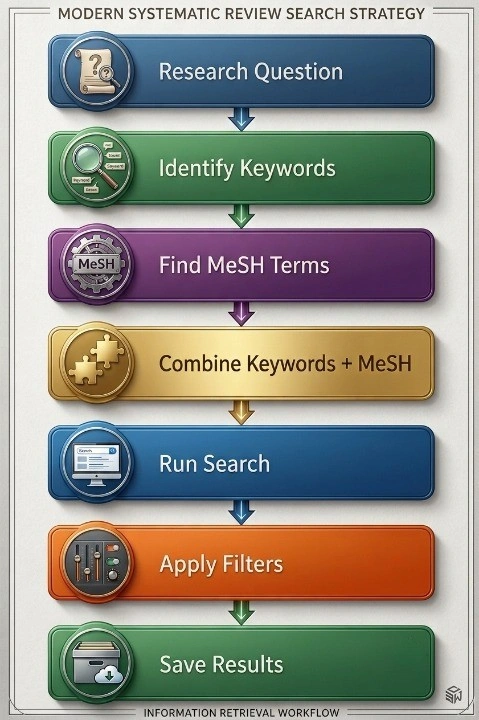
Narrow Your Results with PubMed Filters
Once your results are on screen, filters are how you trim the pile. Look to the sidebar on the left.
The ones worth knowing:
- Publication date; stick to recent work, say the last five years.
- Free full text; only shows what you can actually read without paying.
- Article type; this is the good stuff. Narrow to systematic reviews and meta-analyses. Strong evidence, all in one place.
- Language; only what you can read.
- Humans; skip the animal studies when you need clinical data.
- Age groups; adults, kids, or older adults.
A word of warning, though. Don’t go filter-crazy. Pile on too many and you’ll bury good papers without noticing. Flip on one or two, see what survives, then adjust. You’re trying to trim the results, not gut them.
Use Advanced Search to Build Better Queries
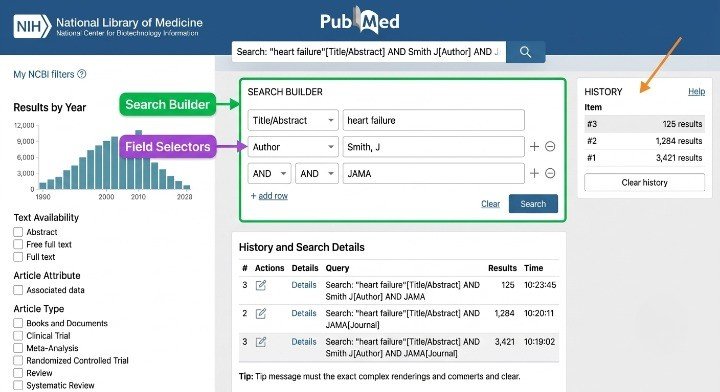
When a plain search runs out of steam, hit “Advanced” right under the search bar. That opens the Search Builder.
Think of the Builder as a way to put your query together brick by brick. You can point PubMed at specific fields so it only looks where you tell it to.
- [Title] searches titles and nothing else.
- [Author] pulls up one person’s work.
- [Journal] locks results to a single journal.
There’s an affiliation option too, handy for tracking down work from a particular university or hospital.
The real gem, though, is Search History. It logs every search you run, and you can mash them together and combine search #1 and search #3 with AND, for instance, without retyping a thing.
Save Articles and Organize Your Literature
Tracking down great papers is only half the job. Lose track of them and you’re right back where you started.
PubMed lets you drop articles into Collections, which are really just folders tied to your account. You can also export the citations in a format other software understands.
For anything serious, get a citation manager. These things hold your papers and build the reference list for you. The usual three:
- Zotero (free)
- EndNote
- Mendeley (free)
Set this up before you write, not after. Organize early and the literature review practically writes itself. Digging through a chaotic folder of unnamed PDFs at deadline is a special kind of misery you can skip entirely.
Common PubMed Mistakes Beginners Make
Almost every beginner falls into the same traps. Here they are, with the fix for each.
Searching whole questions. Fix: strip it down to a few core keywords.
Riding one keyword. Fix: add synonyms with OR so nothing slips past.
Skipping MeSH. Fix: look up the MeSH term and toss it in.
Never touching filters. Fix: article type and date filters do wonders.
Stopping at the abstract. Fix: read the full paper before you cite it. Abstracts hide the messy details.
Overlooking systematic reviews. Fix: filter for them early, they bundle heaps of research into one place.
Losing your search history. Fix: keep a record so you can rerun or tweak it later.
None of these fixes take much effort, and every one of them sharpens your results.
Pro Tips to Search PubMed Faster
Basics locked in? These will pick up your pace.
- Throw synonyms at it so you catch every version of a term.
- Raid the reference list of any solid paper.
- Click “Similar Articles” on a page you like.
- Go broad first, then reel it in with filters.
- Skim a recent review before anything else to get your bearings.
- Save the searches you keep repeating.
- Turn on email alerts so PubMed pings you when new papers land.
That last trick is quietly brilliant. No more running the same search over and over, the results just show up on their own.
Conclusion
Searching PubMed is a skill you build, not a knack you’re born with. Your first few tries will be clumsy, and honestly, that’s fine. Keep at it, and you’ll get fast.
Clear question, MeSH and keywords side by side, Boolean operators, filters used with a light touch, each piece nudges you closer to the papers that count.
Do it well, and everything downstream gets better: your research, your literature reviews, the decisions you build on top of them. So don’t just nod along. Open PubMed, grab a topic of your own, and run a search right now.
If you are an IMG or a young researcher stepping in the world of research, getting yourself familiarized with PubMed is the first thing to do. At the American Academy of Research and Academics, we offer research modules teaching you basic research methodology, including PubMed searching. Visit our website and enrol to learn more about this valuable skill.
American Academy of Research & Academics
You can search PubMed now. That’s step one of becoming a researcher.
AARA’s Basic Research Methodology course takes you from literature searching to study design, PICO, and analysis, the full foundation IMGs and young researchers need to produce a paper worth publishing.
Frequently Asked Questions
How do I search PubMed more effectively?
Lead with a clear question, use a handful of core keywords instead of full sentences, add Boolean operators, and pair your keywords with MeSH terms.
What are MeSH terms in PubMed?
They’re the official subject tags the National Library of Medicine adds to every article, gathering different words for the same idea under one standard heading.
Is PubMed better than Google Scholar?
For medical topics, yes, it’s tighter and better curated. Scholar wins when you need a broad sweep across lots of fields at once.
How can I find systematic reviews on PubMed?
Run your search, open the “Article Type” filter, and pick “Systematic Review” or “Meta-Analysis.”
Can I access full-text articles on PubMed?
Some of them. The “Free full text” filter shows what’s open; for the rest, PubMed points you to the publisher, where a subscription may be needed.
Do I need a PubMed account to search articles?
Nope. Searching is free for anyone. An account only matters if you want to save articles, save searches, or set up alerts.
Disclaimer:
Articles published by American Academy of Research & Academics are prepared by our team using information from direct experience, publicly available resources, and educational references. AI tools may be used to assist with drafting, proofreading, and formatting; however, all content undergoes review and approval before publication.
The information provided is intended for educational purposes only. Requirements, policies, and processes may change over time. Readers should consult official sources for the most current information.